CONTENTS
LogCase 6.40 is now on the App Store. LogCase Full Colour gets new ways to finish a picture before you cast it, and every LogCase can now use pictures from the Files app.
A new Look panel
For LogCase Full Colour.
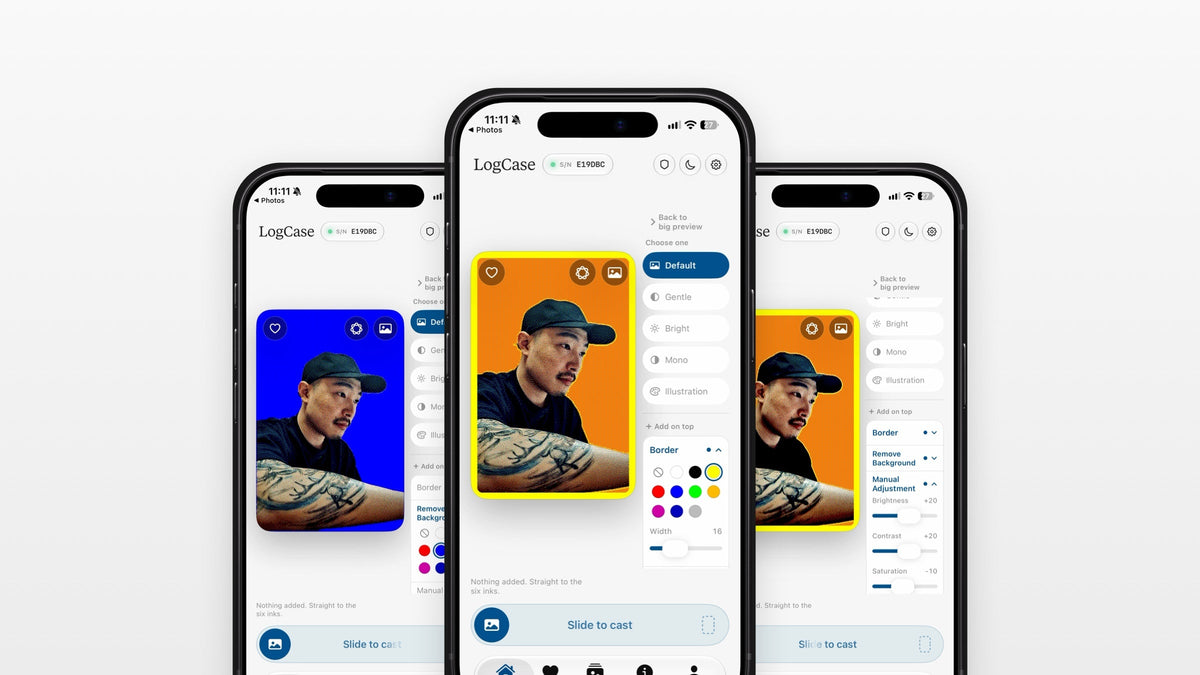
The Look panel now has two groups. Choose one holds the five looks. Add on top holds three new tools: Border, Remove Background and Manual Adjustment. A look, a border, a new background and the sliders can all be used together.
Border
Border adds a line around your picture. You can adjust its width and choose from 10 colours.
White, black, yellow, red, blue and green are the panel's six inks, printed solid. Orange, purple, navy and grey mix two inks in a fine pattern, so you will see small dots up close.
The line covers the outer edge of the picture. It does not shrink the picture to fit, so leave a little room around your subject. With a border on, the picture's corners are slightly rounded to sit neatly inside the rounded window of the glass.
Remove Background
Remove Background lifts the subject off your photo and fills the rest with any of the same 10 colours. It runs entirely on your iPhone. Your photo is not sent anywhere.
It works best on people, pets and single objects. Scenery, or a picture with no clear subject, may not work, and the app will tell you when that happens.
Manual Adjustment
Sliders for brightness, contrast and saturation, applied on top of the look you have chosen.
Using them together
Borders, backgrounds and slider settings are not saved with favourites. A favourite keeps the cropped picture only.
Import from Files
For every LogCase.
Pictures can now come from the Files app as well as Photos. Open the menu on the photo button over the preview and choose Files, or choose Choose from Files on the empty preview.
How to update
Open the App Store, open your account, and pull down to refresh. LogCase 6.40 requires iOS 27.
Thank you for your requests
What is new in this version came from your requests. Thank you. If there is something else you would like to see, please send it to us.